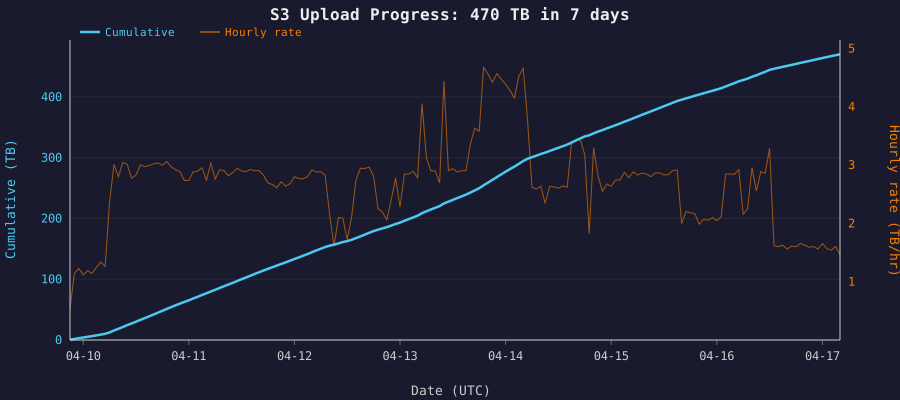
I needed to copy ~400 TB of geospatial embedding data (12 million files) from a CephFS cluster in Scaleway Paris to an S3 bucket in AWS us-west-2.
Starting from zero #
My starting point was unpromising: an IAM username and password. No access keys, no CLI configured. The IAM account was locked down enough that I couldn’t even list access keys, let alone create them. The Security Credentials page in the AWS console returned Access Denied for iam:ListAccessKeys. A lucky guess that iam:CreateAccessKey might be a separate permission didn’t pan out either.
The admin had configured things so that the IAM user credentials could be used only to assume a specific role, TesseraEmbeddingsS3Role, which granted S3 access. Once I figured that out, and the settings fixed, a simple profile in ~/.aws/config made it seamless:
[profile tessera]
role_arn = arn:aws:iam::xxxxxxxxx954:role/TesseraEmbeddingsS3Role
source_profile = default
Ceph Storage and predictions #
The data sat on a 15-node CephFS cluster with erasure coding (3+1), spread across 60 OSDs. Each node had a 1 Gbps network interface. The target was an S3 bucket in us-west-2, which is in Oregon, so roughly 9,000 km from Paris.
I could have mounted CephFS on one of the cluster nodes and uploaded directly, but that single 1 Gbps interface would be split between reading from the cluster and uploading to S3. Since S3 is a push-only target, the upload must originate from the machine that holds the data. This led to the idea of a dedicated staging machine with a 10 Gbps interface: the CephFS kernel client aggregates reads across the cluster’s many 1 Gbps links, and the full 10 Gbps is available for the upload to S3.
At 10 Gbps: 400 TB in about 4 days. At 1 Gbps: 50 days.
Choosing a machine #
Not every Scaleway instance ships with a 10 Gbps interface, and those that do don’t necessarily include 10 Gbps of bandwidth.
The EM-B220E was the cheapest elastic metal machine I could find with a 10G interface, but it only includes 1 Gbps of public bandwidth at that base price. Upgrading it to 10 Gbps was nearly five times the hourly cost. Looking at the virtual machines, the small POP2-HN-10, which already included 10G egress in the base price, was the clear winner at less than half the price.
| Instance | Specs | Bandwidth | Cost |
|---|---|---|---|
| POP2-HN-10 | 4 cores, 8 GB | 10 Gbps | €0.7264/hr |
| EM-B220E-NVMe | 1 × AMD EPYC 7232P 8C, 64 GB | 1 Gbps | €0.333/hr |
| EM-B220E-NVMe + 10 Gbps | 1 × AMD EPYC 7232P 8C, 64 GB | 10 Gbps | €1.57/hr |
Tuning the number of threads #
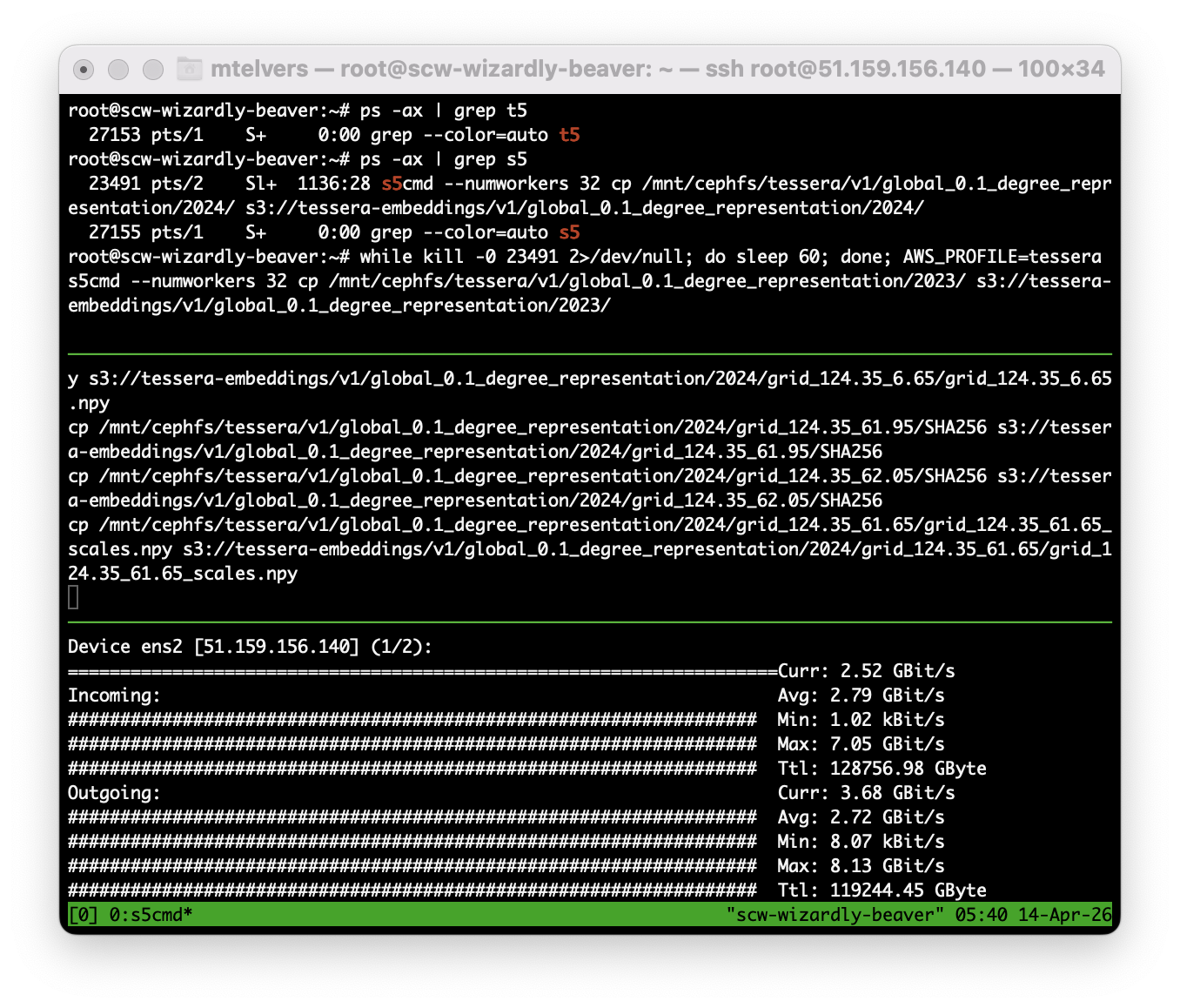
I decided to use s5cmd, a parallel S3 client written in Go that runs multiple concurrent transfers. Installation is trivial as it’s a single binary.
s5cmd defaults to 256 concurrent workers. On the face of it, more parallelism means more throughput, especially when there is a 153 ms round-trip time. However, on my new VM, the figures from nload showed nothing much was being uploaded to S3.
Incoming:  5.82 GBit/s  (reading from CephFS)
Outgoing: 98.80 MBit/s  (uploading to S3)

load average: 519.37
%Cpu: 3.9 us, 78.4 sy
A load average of 519 on a 4-core machine. 78% of CPU time was spent in the kernel and only 4% in userspace. The 6 Gbps of CephFS reads weren’t translating into uploads as the outgoing rate was just 100 Mbps. I speculate that this is due to all those threads performing a read-ahead on the Ceph cluster, and with limited RAM, there’s nowhere to store it.
Restarting with 32 workers achieved a balanced read and write rate with a load average of 16, and the actual upload throughput increased by a factor of 30.
Incoming: 3.20 GBit/s
Outgoing: 3.12 GBit/s
I tried 48 workers, but there was no improvement in upload speed but the load average was higher!
Scaling out #
With one machine settled at ~2.8 TB/hr, I estimated about 6 days to complete. I could do better by adding machines. Could the Ceph cluster handle more? I had an Ansible playbook by this time, which automated the setup: CephFS mount, AWS credentials, s5cmd installation, so spinning up a new worker was a single command:
ansible-playbook -i inventory.ini s3-sync-setup.yml --limit s3-sync-2
The data is organised as v1/global_0.1_degree_representation/{2017..2025}, which made it easy to partition. With two Scaleway machines, I split the work across the year directories: one started with 2017 and worked forward, and the other with 2025 and worked backwards.
Both machines were able to upload at identical rates, showing that Ceph was able to cope with the load. ceph -s showed ~900MiB/s read rate.
The only problem was that I started them running without actually fully planning what I was going to do. After all, I wasn’t sure that Ceph would sustain the load. So I ended up with a s5cmd cp running on both machines for a single year, but what if it finished when I was asleep? I didn’t want that machine to sit idle until the morning.
In another shell, I found the process ID of the s5cmd process and then ran this while loop, which polled the running process and then started a new copy:
while kill -0 $PID 2>/dev/null; do sleep 60; done; \
  AWS_PROFILE=tessera s5cmd --numworkers 32 cp \
  /mnt/cephfs/tessera/v1/global_0.1_degree_representation/2024/ \
  s3://tessera-embeddings/v1/global_0.1_degree_representation/2024/
Monitoring #
S3 doesn’t offer a real-time “how much data is in this bucket” API. The BucketSizeBytes CloudWatch metric updates once per day.
CloudWatch’s BytesUploaded metric was more useful, but its presentation is confusing. Given the graph below, what is the upload rate? I initially read this as 300GB per hour on that flat part of the graph, since the axis is Bytes vs Hours, but that isn’t how it works.
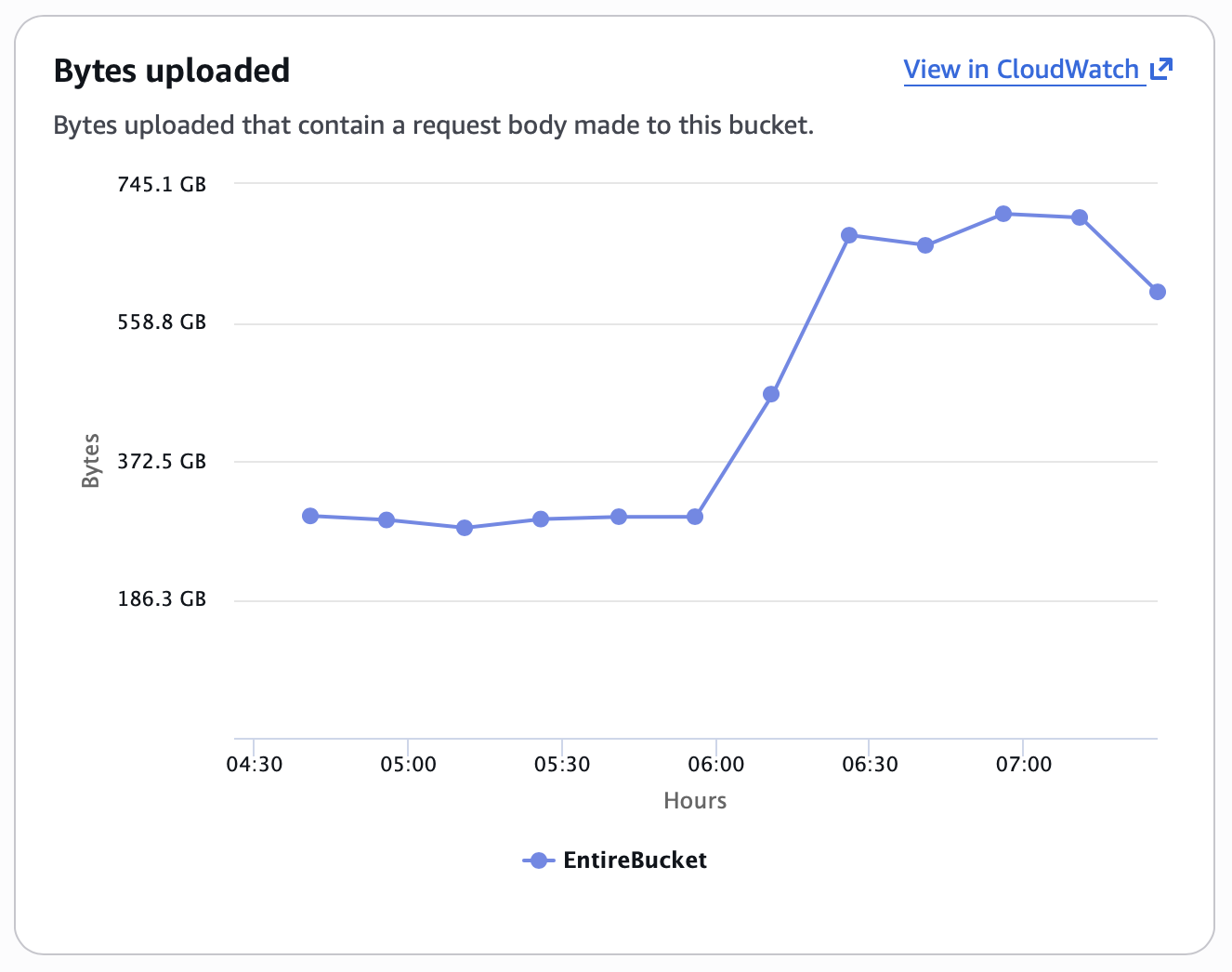
It is actually the rate per data point; on that chart, there are 4 data points per hour, so 1.2 TB per hour. The Y-axis value represents a Sum over Period.
Disappearing data #
A few days into the transfer, the BucketSizeBytes metric started going down:
| Date | StandardStorage |
|---|---|
| Apr 12 | 145.6 TB |
| Apr 13 | 137.7 TB |
| Apr 14 | 109.8 TB |
Had I made a mistake and was syncing a different year over the top of another?
The bucket has an Intelligent-Tiering lifecycle rule. S3 Intelligent-Tiering automatically moves objects between storage tiers based on access patterns, and the BucketSizeBytes CloudWatch metric is reported per storage class. The Standard metric was shrinking because objects were being transitioned to the Intelligent-Tiering class, which is reported as a separate metric, IntelligentTieringFAStorage, which was growing to match.
The original query only checked StandardStorage:
aws cloudwatch get-metric-statistics \
  --namespace AWS/S3 \
  --metric-name BucketSizeBytes \
  --dimensions Name=BucketName,Value=tessera-embeddings \
               Name=StorageType,Value=StandardStorage \
  --start-time 2026-04-14T00:00:00Z \
  --end-time 2026-04-15T00:00:00Z \
  --period 86400 \
  --statistics Average \
  --region us-west-2
To find the true total, query every storage class and sum the results:
for st in StandardStorage StandardIAStorage \
          IntelligentTieringFAStorage IntelligentTieringIAStorage \
          IntelligentTieringAAStorage IntelligentTieringAIAStorage \
          IntelligentTieringDAAStorage \
          OneZoneIAStorage ReducedRedundancyStorage \
          GlacierStorage DeepArchiveStorage; do
  aws cloudwatch get-metric-statistics \
    --namespace AWS/S3 \
    --metric-name BucketSizeBytes \
    --dimensions Name=BucketName,Value=tessera-embeddings \
                 Name=StorageType,Value=$st \
    --start-time 2026-04-14T00:00:00Z \
    --end-time 2026-04-15T00:00:00Z \
    --period 86400 \
    --statistics Average \
    --region us-west-2 2>/dev/null \
  | grep -q Average && echo "$st: present"
done
On 14 April, this showed:
- StandardStorage: 109.8 TB
- IntelligentTieringFAStorage: 190.8 TB
- Combined: 300.6 TB
The numbers #
| Day | Uploaded | Cumulative |
|---|---|---|
| Apr 9 | 2.9 TB | 2.9 TB |
| Apr 10 | 59.7 TB | 62.6 TB |
| Apr 11 | 67.8 TB | 130.4 TB |
| Apr 12 | 60.5 TB | 190.9 TB |
| Apr 13 | 81.6 TB | 272.5 TB |
| Apr 14 | 75.7 TB | 348.2 TB |
| Apr 15 | 62.0 TB | 410.2 TB |
| Apr 16 | 52.2 TB | 462.4 TB |
| Apr 17 | 7.8 TB | 470.2 TB |
Final total: 470 TB across ~12 million objects, completed April 17, 8 days after the first upload.
Peak throughput: 4.68 TB/hr (April 13, 19:00 UTC)