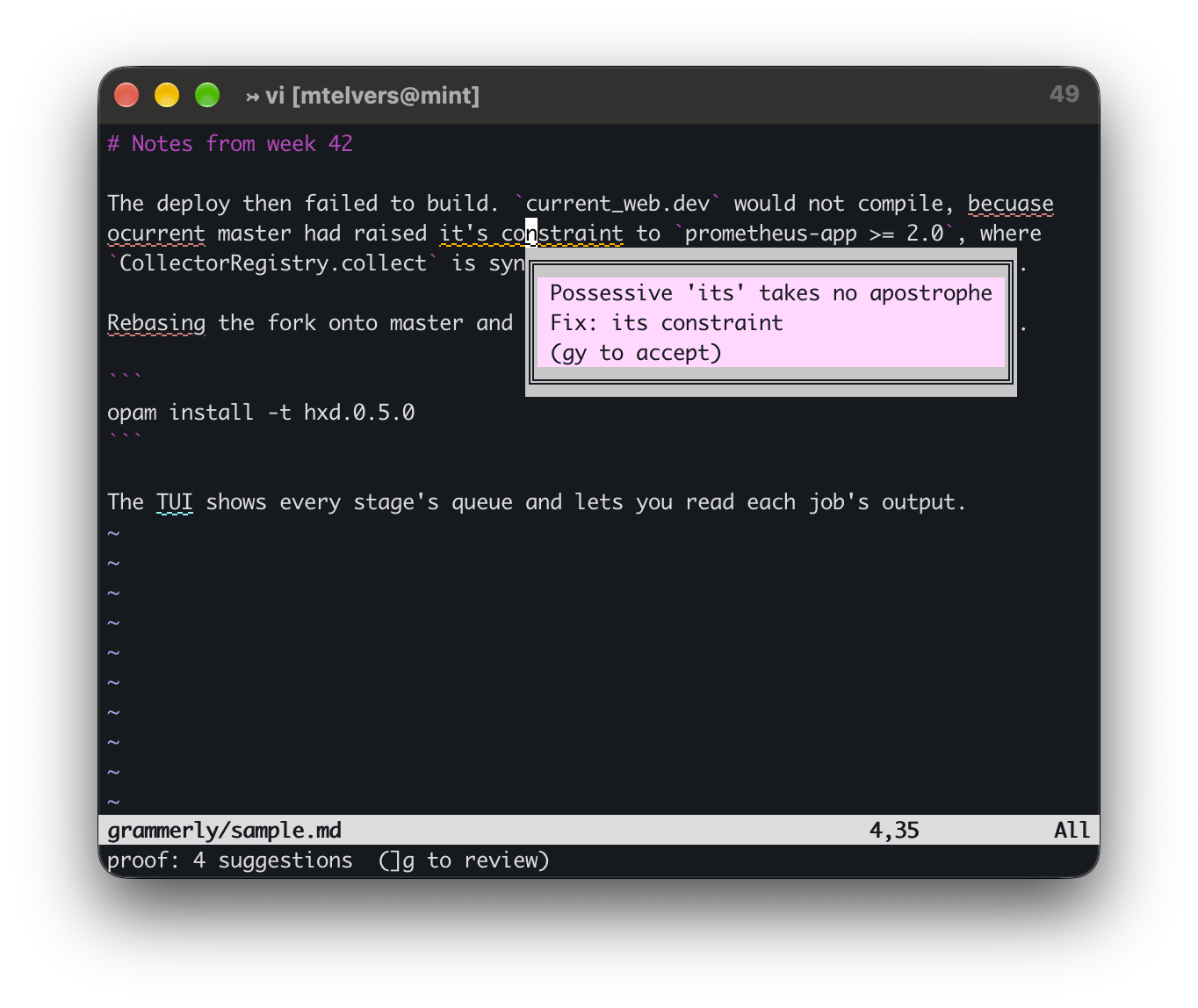
I have been trying out Grammarly, but the editors it integrates with are not the ones I use. I want to write Markdown in vim on Linux and have the same features.
So the question was whether there is a basic Markdown editor that integrates with it, or an alternative that does, or whether I could just call the Grammarly API from the editor I already have.
There is no API #
I liked the idea of calling an API, but it is the option that has been dead the longest. In July 2023, Grammarly announced that it was shutting down its Text Editor SDK, and switched it off on 10 January 2024. Grammarly for Developers stopped taking registrations before that.
All the Vim and Neovim integrations I could find were built either on that SDK or on the private endpoints the browser extension uses. The language server that nvim-lspconfig used to list is archived, and mason marks it deprecated. There is no official public API, and there has never been a Linux desktop application.
So the only way to get Grammarly on Linux is a browser extension, which isn’t really the answer I was looking for.
Could the machine do it on its own? #
The interesting alternative was a local model, mostly because everyone wants to play with a local model!
My machine does not have a GPU, so this was largely a non-starter for me. Generating each token means streaming the whole model’s weights through the CPU, so the speed is set by memory bandwidth rather than by core count. This machine is two Xeon E5-2640 v4s, twenty physical cores, AVX2 but no AVX-512, but with plenty of RAM. A 7B model quantised to four bits is about 4.5 GB, and that much memory traffic per token puts generation at roughly 6 to 10 tokens a second. Reading the prompt is compute-bound instead, and runs at something like 40 to 60 tokens a second.
Put a 150-word paragraph in and take a corrected one out and you are waiting 20 to 40 seconds. A thousand-word document is a few minutes.
That is fine for a deliberate “proofread this before I commit it” but not really the interactive “while you type” feedback that Grammerly offers.
The tool that was already installed #
The next question was whether my subscription covers the Claude API, or whether this would just be a case of piping text into the claude executable. It is the latter. A Pro or Max subscription covers claude.ai and Claude Code, which is what the claude binary uses, not API credits.
claude -p --no-session-persistence --tools "" --model sonnet --effort low \
  --output-format text \
  --system-prompt "You are a copy editor. Fix spelling, grammar and punctuation only. \
Do not change meaning, tone, Markdown syntax or line breaks. \
Output only the corrected text with no commentary." < para.md
That took 3.6 seconds on a test paragraph, against my estimate of 20 to 40 seconds that a local model would have taken. It’s important to remember, though, that the text leaves the machine, and every call draws on the subscription’s usage limit. However, I publish everything on GitHub or on my blog so there’s no privacy issue for me.
Back where I started #
At that point I had a way to produce corrections and no way to see them. What I actually want is the lazy underlining Word does, and a shell pipe does not give me that. It felt like going round in a circle.
It was not, because the underline layer is a separate problem from the thing that produces the findings, and Vim already has a solution. A standard Vim 9 build has +job to run something in the background, +textprop to attach a highlighted span to a range of text that moves correctly when you edit around it, and +popupwin to show a floating window at the cursor. That is the whole of Word’s interface.
proof.vim #
With these components I was able to write proof.vim, 323 lines of Vim9 script in one file, with no plugin manager and no dependency beyond a logged-in claude on $PATH.
cp proof.vim ~/.vim/plugin/
Open a Markdown file and pause. After four seconds idle, which is Vim’s updatetime setting, or whenever you save, the buffer goes to Claude in the background through job_start and each problem span comes back underlined. You carry on editing while it runs. Rest the cursor on an underline and a pop-up gives you the reason and the suggested fix, which is the hover behaviour from Word.
The system prompt asks for nothing but a JSON array, where each element has the faulty text copied verbatim, the replacement, and a reason under twelve words. Asking for the original text verbatim rather than a line and column is what makes the spans survive the fact that you have been typing since the request went out: the plugin finds the string and attaches a text property to it, and Vim then keeps that property in the right place on its own.
:Proof |
check the buffer now |
:ProofClear |
remove the underlines |
:ProofAuto |
toggle checking on idle and on save |
]g / [g |
next and previous suggestion |
gh |
show the reason and the fix |
gy |
accept the fix under the cursor |
The settings are g:proof_model (sonnet by default), g:proof_effort (low), g:proof_auto, g:proof_filetypes (markdown, text, tex, plaintex, mail, gitcommit, rst and asciidoc), g:proof_max_bytes (40,000, so it refuses to send a large buffer by accident), g:proof_no_maps and g:proof_highlight.
Underlining text #
Vim’s built-in spell checker has been there since version 7, with underlining as the default in GUI Vim. Adding set spell spelllang=en_gb to your .vimrc turns it on. In a terminal, though, Vim’s defaults mark misspellings with solid coloured backgrounds instead, which produced unreadable cyan and pink blocks.
The rules predate undercurl and use solid background blocks: red for SpellBad, blue for SpellCap, cyan for SpellLocal, magenta for SpellRare. For example, the cyan block above was SpellLocal, with the pink underneath being Markdown’s own syntax colouring showing through.
As usual I was working in a tmux window which needed to be told that the outer terminal understands underline styles and colours:
set -as terminal-features ",xterm-256color:usstyle"
vim had to be told the escape codes directly, because the tmux-256color terminfo entry has no undercurl capability at all:
let &t_Cs = "\e[4:3m"               " start undercurl
let &t_Ce = "\e[4:0m"               " stop undercurl
let &t_AU = "\e[58;5;%dm"           " underline colour (256-colour index)
let &t_8u = "\e[58;2;%lu;%lu;%lum"  " underline colour (RGB)
And the four spell groups had to be redefined as coloured undercurl styles with no background, reapplied whenever a colour scheme loads, since loading one resets them.
One last thing was that both grammar and spelling were underlined in red, so you could not tell which was which. Grammar suggestions from Claude are now orange and spelling stays red, with blue for capitalisation, magenta for rare words and cyan for the wrong regional spelling. Vim’s own suggestions are still on z=.
The plugin is available at mtelvers/proof.vim