The Milk-V Jupiter 2 is billed as “The first RVA23-compliant RISC-V SBC”, and I put it to work as a CI worker.
Our RISC-V workers are a HiFive Unmatched (carpenter) and a few Scaleway EM-RV1 boxes. They are all RV64GC, which is fine for Ubuntu 24.04, but Ubuntu raised the riscv64 baseline to RVA23 with 26.04, so they are stuck where they are. The Milk-V Jupiter 2 is built around SpacemiT’s K3 and is RVA23 compliant, so it should be able to run the latest Ubuntu release.
Getting connected #
The board came with Bianbu 4.0.1, SpacemiT’s own distribution: Ubuntu 26.04 with their archive, their 6.18 kernel and a full desktop. To connect a screen, you need a monitor that accepts a USB connection. I didn’t have one spare, so I connected the USB console port on my Raspberry Pi, installed adb, and connected using adb shell.
The board has a 10G SFP+ port alongside the standard 1000BASE-T port, and I happened to have a Cisco SG300 with two SFP ports, so I tried to connect them via a 10G direct-attach cable, assuming it would downgrade to the lowest common denominator. That didn’t work, and attempts to force the RTL8127 to advertise 1000BASE-T/Full hung the board completely, so I gave up and used the RJ45 port instead.
For storage, I reused the 500 GB NVMe from a failed HiFive worker. NVMe drives aren’t cheap at the moment, particularly if you want a good one! The board also has 128 GB of UFS 2.2 storage where Bianbu was installed, but I wasn’t sure what the reliability of that would be. The HiFive workers would wear out their SD cards in a few months.
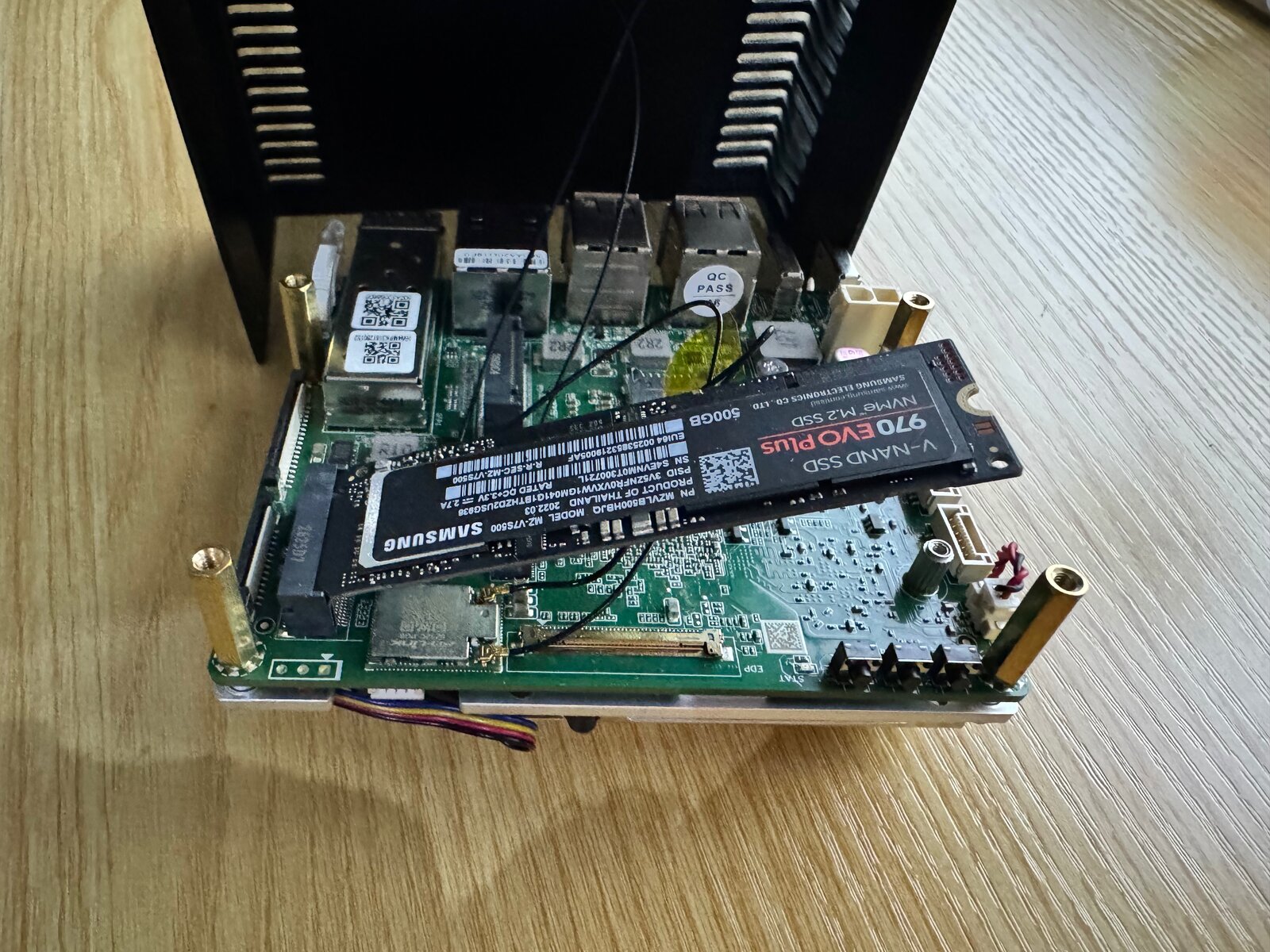
The Jupiter 2 out of its case, with the recycled NVMe
Ubuntu #
Canonical says the K3 is supported from 26.10, with 26.04 support “at a later point in time”. I wanted the LTS release, so I tried 26.04.1 anyway. First, the board needs EDK2 in its SPI flash in place of SpacemiT’s U-Boot, which Canonical’s spacemit-k3-flash-firmware script writes over USB while the board is in download mode. The script says it leaves the UFS alone. It didn’t: it rewrote the UFS partition table, rendering Bianbu unbootable.
After the flash, there was no sign of life at all, not even a link light, so I needed a serial console. The debug UART is a little three-pin connector next to the USB-C power input, and the pinout is given in section 5.2 of SpacemiT’s K3 Pico-ITX User Guide. The Pi 5 has a spare UART on GPIO 14 and 15, so three jumper wires later, I had a console.
| Board pin (left to right, USB-C ports facing you) | Pi 5 header |
|---|---|
| TX | pin 10 (GPIO15, RXD) |
| RX | pin 8 (GPIO14, TXD) |
| GND | pin 6 (GND) |
The Pi’s UART is enabled with dtoverlay=uart0-pi5, and the console runs at 115200 baud.
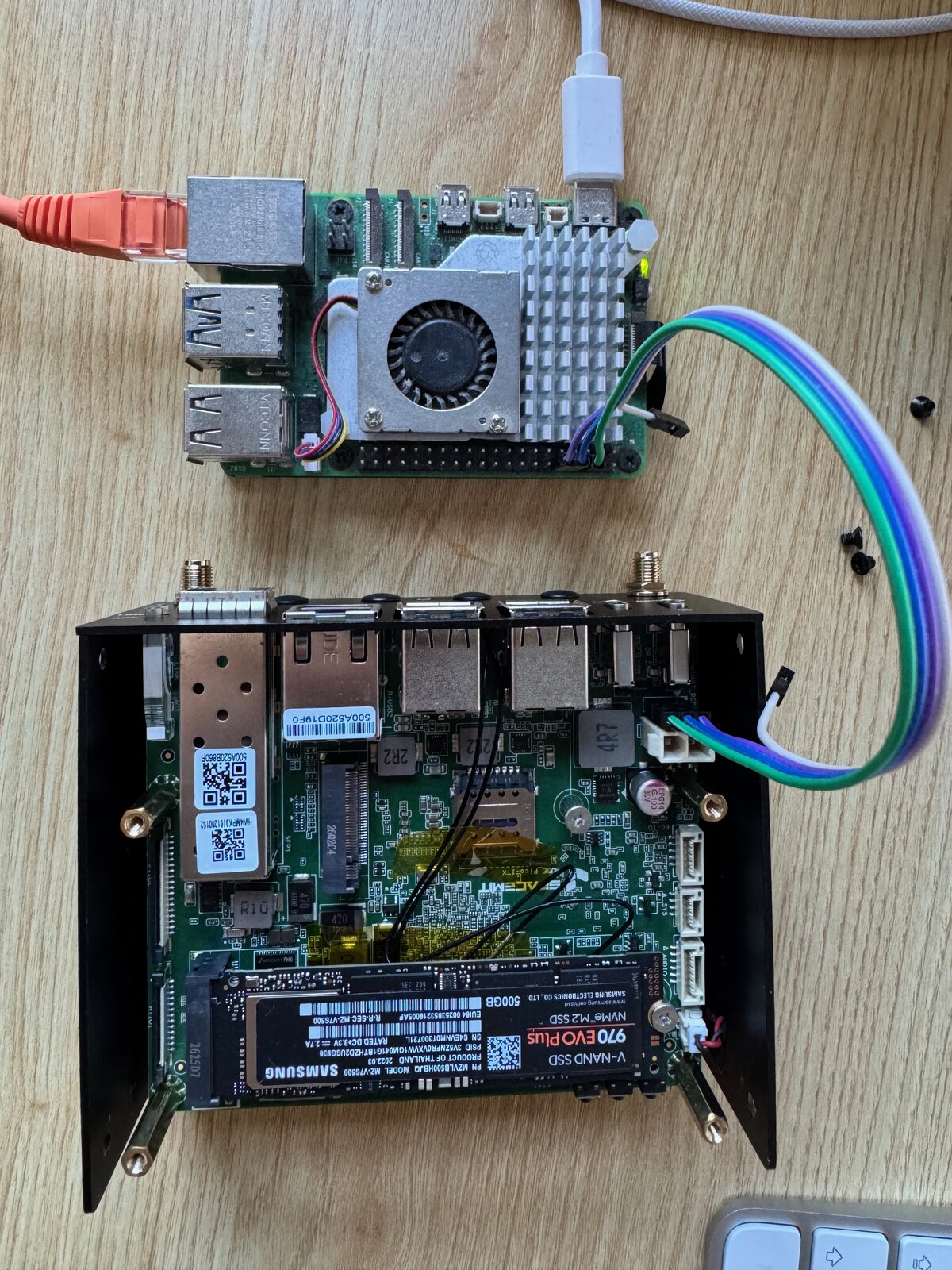
The Pi 5 wired to the board’s debug UART
With a console, it was obvious what was wrong. EDK2 and GRUB were fine, and 26.04.1’s 7.0 kernel started, but it simply has no K3 support: no interrupts, no storage and no network, so it sat waiting for a root disk which would never appear. Canonical meant what they said about 26.10! The A100 cores also added 80 seconds to every boot, as each one fails with “RISCV_ISA_V only supports one vlenb on SMP systems” because its vector length differs from the X100s’. maxcpus=8 avoids that.
So I switched to 26.10; booting from a USB stick failed because the default grub.cfg lacked a devicetree entry. Interrupting GRUB over the serial port, the following sequence booted the board with the UUIDs of my stick:
search --no-floppy --fs-uuid --set=root 31c543f1-8746-4a39-9990-b349f2bf73b7
search --no-floppy --fs-uuid --set=esp DD8B-75F7
devicetree ($esp)/dtb/spacemit/k3-pico-itx.dtb
linux /boot/vmlinuz-7.3.0-9-generic root=LABEL=usb-rootfs ro earlycon console=ttyS0,115200 maxcpus=8
initrd /boot/initrd.img-7.3.0-9-generic
boot
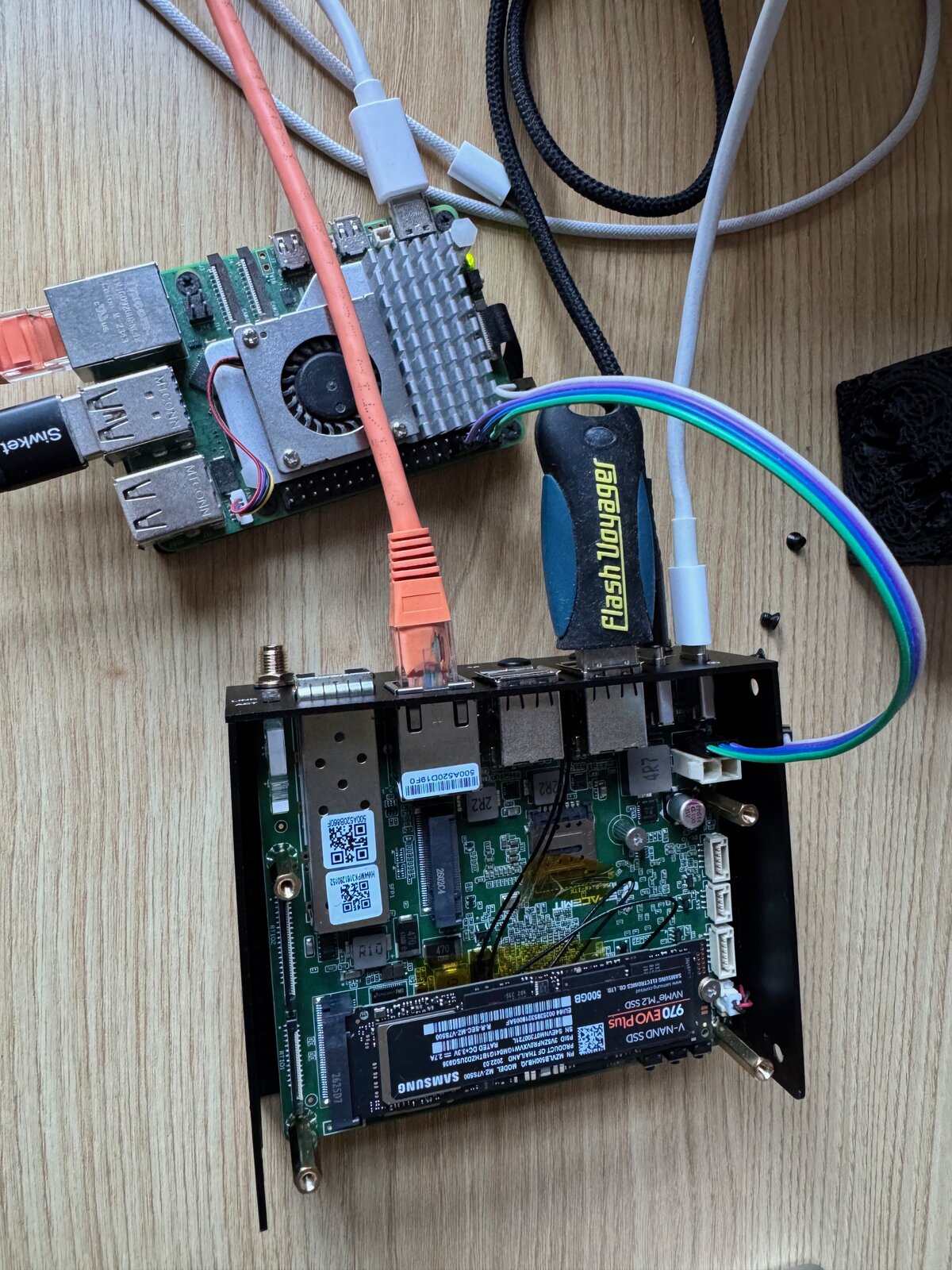
Booting Ubuntu 26.10 from a USB stick
From there, I put Ubuntu 26.10 on the UFS and split the NVMe between /var/lib/docker and /var/cache/day10. A kernel postinst hook copies the K3 DTB to /boot/dtb-<version>, which Ubuntu’s GRUB script picks up as a devicetree line, so it survives kernel upgrades.
A day10 worker #
The day10 worker playbook needed a few additions for a new Ubuntu release: docker-buildx and the worker’s runtime libraries, which the other machines already had. Docker 29 also defaults to the containerd image store, which would have put every image on the UFS, so I turned that off.
jupiter2 joined the day10-linux-riscv64 pool at capacity 4, and in its first four hours it started 362 jobs, against carpenter’s 47 and riscv-bm-04’s 24. I was pleased with that. Of the 92 failures, 83 failed on x86_64 too.
Overheating #
That evening, the box felt very hot. The NVMe was reporting 95C, with a second sensor at 109C, against a critical limit of 85C. Ubuntu’s 7.3 kernel has no thermal zones for the SoC and no fan control, so nothing was monitoring the temperature, and the fan just sat at whatever speed the firmware had set.
The dmesg output looked bad: kswapd had crashed on a paging request at 0100000002000000, and the compiler was segfaulting on corrupted-looking pointers. I paused the worker and rebooted, and the reboot hung. At that point I thought it best to power it off.
On the K3 Pico-ITX, the fan is controlled by the host. In SpacemiT’s kernel, a thermal sensor on the SoC drives a PWM fan provided by the embedded controller, which sits on the SoC’s eSPI bus as a ChromeOS EC. None of the three drivers involved is upstream, and neither are the device tree nodes. There’s an open Launchpad bug with the same symptoms.
Ubuntu’s K3 PPA does include SpacemiT’s kernel, packaged as linux-k3-6.18. Its first boot panicked two seconds in, in the driver for the board’s real-time core, which seems to touch memory that Canonical’s firmware lays out differently. Blacklisting that driver with initcall_blacklist=spacemit_rproc_driver_init got it booting, and the fan control came to life. I also added panic=10 so that a panic reboots the board rather than letting it cook.
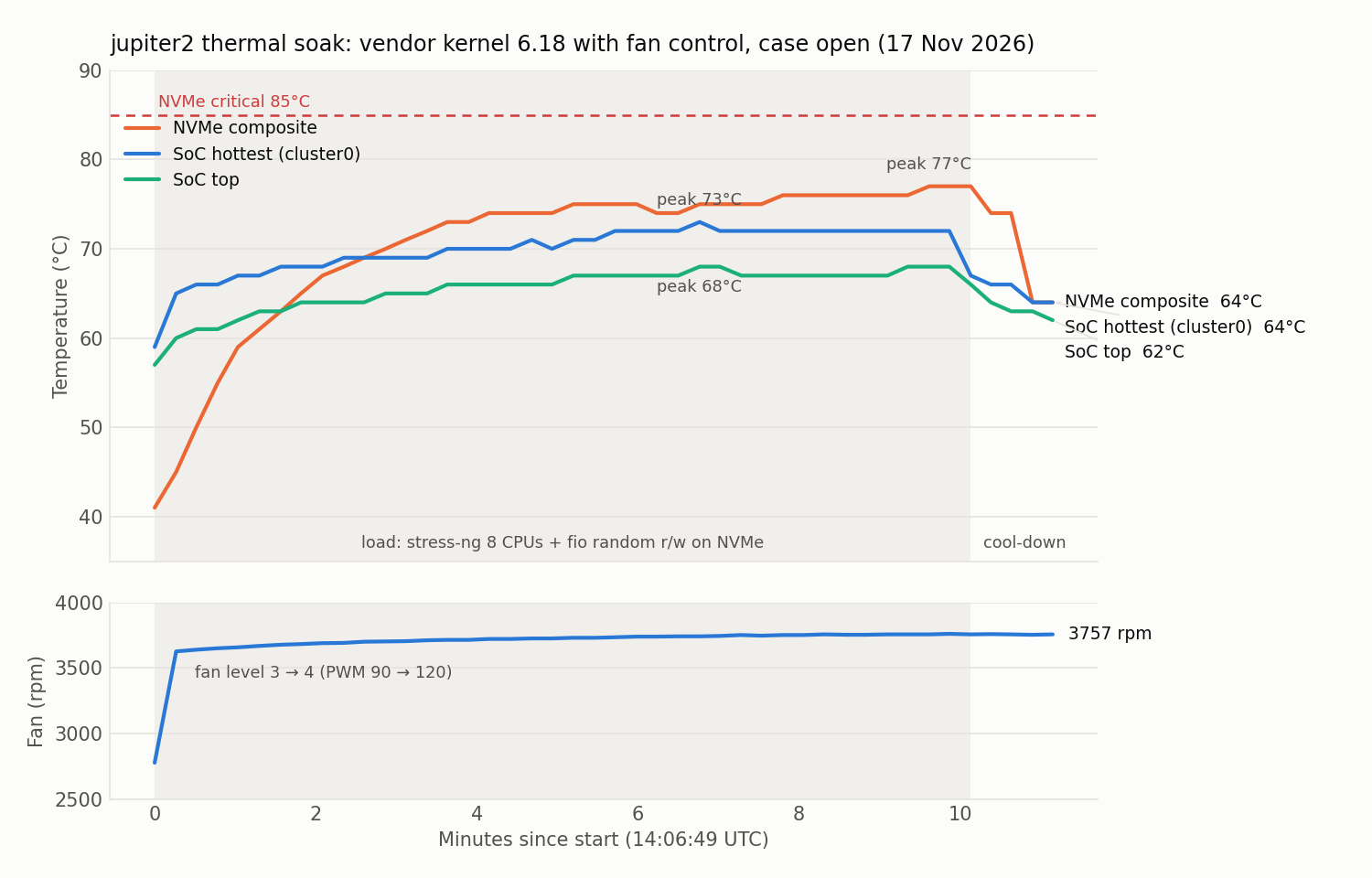
Ten minutes of stress-ng on all cores plus fio random writes on the NVMe
Under load, the fan stepped up within 15 seconds, and the SoC levelled off at 73C. The NVMe still climbed from 41C to 77C, as it’s on the back of the board with no airflow from the fan. I ordered an M.2 heatsink, which roughly halved the rate of rise, with a peak of 67C. Annoyingly, it’s taller than the listed dimensions, and the case no longer closes, but given the lack of airflow, that’s probably a good thing.
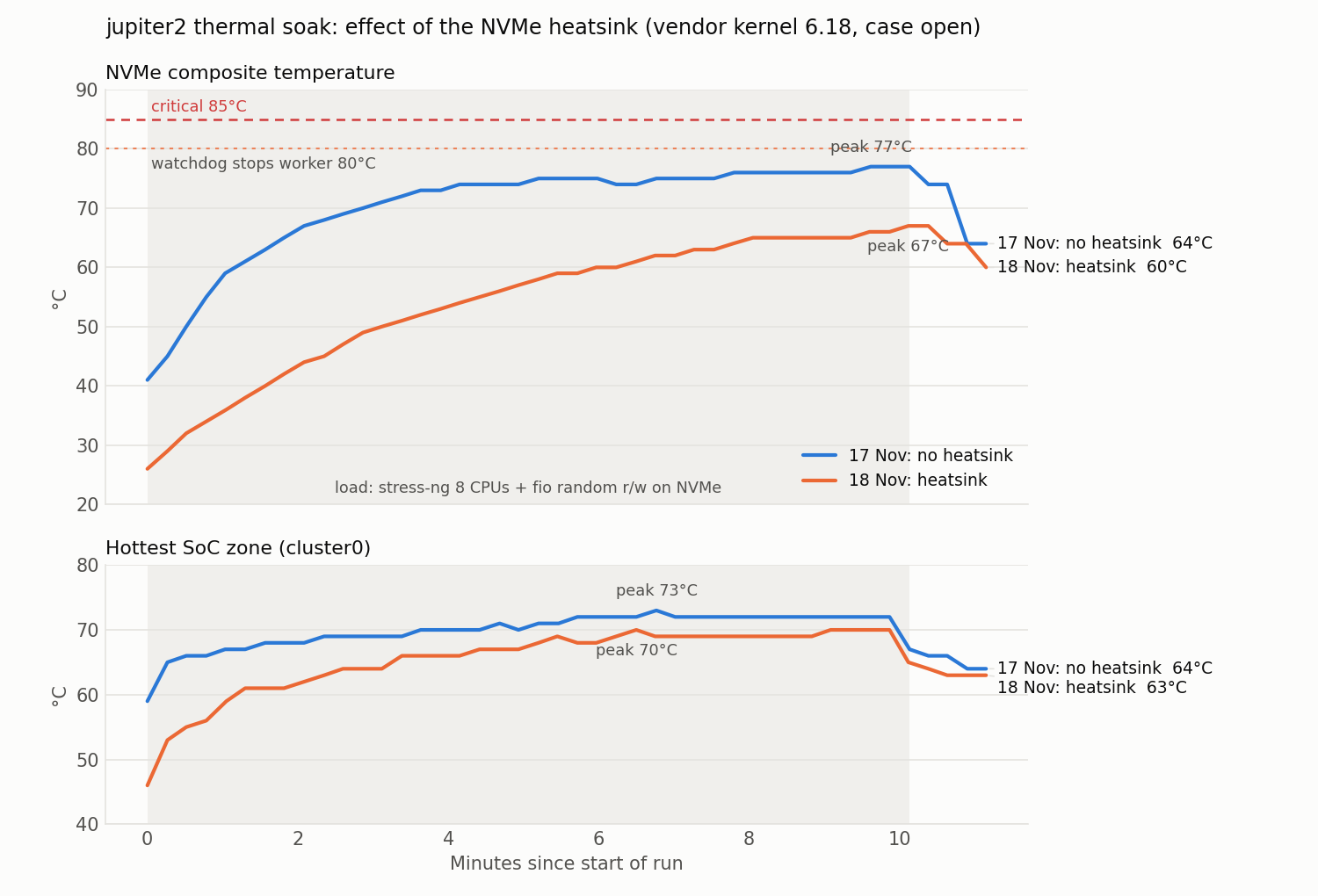
NVMe and SoC temperatures with and without the heatsink
As a backstop, a watchdog runs every minute and stops the worker if the NVMe reaches 80C or the SoC 90C. It deliberately never restarts it.
Fan control on Ubuntu’s kernel #
SpacemiT’s kernel works, but I’d rather run Ubuntu’s, so I asked Claude to try porting the fan support to 7.3 as a proof of concept. That meant the three vendor drivers as out-of-tree modules, plus the ChromeOS EC drivers, which are upstream but not enabled in Ubuntu’s riscv64 build. Surprisingly, the only API change was tz->devdata becoming thermal_zone_device_priv(tz).
The first boot ignored the modified device tree completely. Ubuntu’s 7.3.0-10 kernel image carries its own device trees and chooses one itself, regardless of what GRUB passes, which 7.3.0-9 didn’t do. Extracting the bare kernel with objcopy --only-section=.linux sorted that out. The second boot found the EC and ran the fan flat out, because one thermal zone was missing and the driver refused to register any of them. With all seven zones in place, the fan stepped up at the 55C trip and back down again, on Ubuntu’s own kernel!
The temperatures did read about 15C lower than on 6.18. The current vendor driver reads a per-chip calibration value from the efuses and falls back to 0xD8, whereas the packaged 6.18 kernel hard-codes 0x9A. This board’s efuse slot is empty, so neither number is really its own.
For a proper deployment, the drivers and device tree nodes need to be upstream, or at least in Ubuntu’s kernel. Until then, jupiter2 stays on the vendor kernel.
Where it is now #
jupiter2 has been in the day10-linux-riscv64 pool at capacity 2 since 21 November, on the vendor 6.18 kernel with the fan working, the heatsink fitted (case open), and the watchdog running. The last oddity was runc complaining in every container that it couldn’t reset the CPU affinity. maxcpus=8 only stops the A100 cores from being brought up; they were still in the possible CPU mask, so runc tried to use them. Adding nr_cpus=8 made them go away.